Tuesday, October 13, 2009

Blogspot layout guide

For blogspot

Layout Guide

Print
Blogger's Layout feature is an easy-to-use template editing feature that allows you to edit and customize your Blogger template without any knowledge of HTML or CSS. You can easily edit and customize the colors, fonts, header and sidebar of your blog with a few clicks of the mouse. To customize your blog's layout, go to the Layout | Page Elements tab in Blogger. Layouts Tab
If you're using a classic template and would like to use the Layout feature, you can read instructions on how to switch.
Moving elements in your template

How to arrange elements in your template

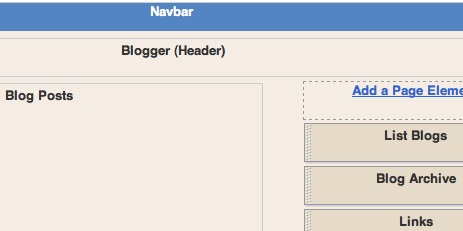
You can arrange the elements in your template the way you want them displayed. Simply click on the element you'd like to move and drag and drop it where you want it to be. You can move your page elements to the bottom of the page, anywhere in your sidebar, or below or above your blog posts. (Note: you can move all elements except your navbar, blog posts and header in some templates.) Layouts
Editing elements in your template

Here's an overview of what you can configure when you click Edit for each of these elements:
  • Navbar: Select the color you'd like your Navbar to be.
  • Header: Add or edit the header of your blog, which includes your blog title and blog description.
  • Blog posts: Choose the number of posts to display on your main page. You can choose either the number of days with posts to display or the total number of posts on the main page. You also have the option to show email post links that let your visitors easily email posts from your blog to their friends.
  • Profile: Edit/add your profile title, 'About Me' description, and location.
  • Blog archive: Edit/add your blog archive title, select your display style (hierarchy, flat list or dropdown menu), choose to display post titles, display oldest posts first, choose your archive frequency (monthly, weekly or daily) and date format.

How to add a page element

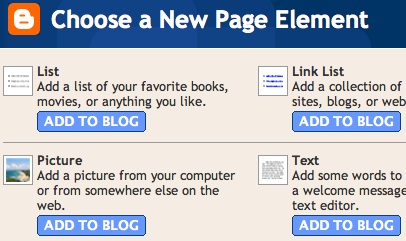
You can add several page elements to your blog page or sidebar by clicking Add a Page Element. This will open a pop-up window. Click Add to Blog in the proper element section to add it:
New Page Element
  • List: Add a list with the ability to add a title, select the number of items to display, sort your list alphabetically and add links to your list elements.
  • Link List: Add a link list to your blog with the ability to add a link list title, select the number of items to display and sort your link list alphabetically.
  • Labels: Add a list of all the labels you've used on your posts. Click each link to see a page showing all the posts with that label. You can change the title of the list, and sort it alphabetically or by frequency of use.
  • Picture: Add a picture from your computer or the web. You can also add a title and caption to your picture and shrink the picture to fit into your blog perfectly.
  • Text: Add text to your blog (such as a welcome message or footnote) with our rich text editor.
  • HTML/JavaScript: Add third-party functionality or other HTML/JavaScript code to your blog.
  • Feed: Add content from a site feed. Enter the feed URL, then click Continue. You'll then be able to add a title, select the number of items to show (up to five) and display the item dates and/or authors by selecting the appropriate check boxes.
  • Logo: Add one of our stylish Blogger logos to your blog.

Business should ditch the Yellow Pages and turn to blogs

Are you running a business? If so, advertising your business is a good way to get more business, and an old, effective way is to advertise your business by placing an entry in the Yellow Pages. But nowadays, how do people search for information? The answer for many people is that they use the Internet and the search engines. And search engines love blogs. There have been many times that I have started a blog and notice hits from search engines in my hit counter statistics not very long after I started the blog. Not only that, quite often, a particular post come up quite high in the search result page, and not infrequently in the first result.

You should always have a hit counter installed to track visitors to your blog. See How to track visitors to your blog. This was written before New Blogger was introduced. It should still work, but it will add a visible counter at the bottom of the page. If you chose an invisible counter, it will make no difference, but if you want the visible counter elsewhere, or want an easier way, for instruction on how to install it for New Blogger by referring to Adding advertisement, hit counter, etc. to New Blogger blog (click BACK button to get back to this page).

So if you run a business, start a website for the business plus do a blog to draw traffic to your business site.
http://www.bloggertipsandtricks.com/2007/05/business-should-ditch-yellow-pages-and.html

Saturday, September 26, 2009

How To Effectively Market With Video On The Web

Online video publishing has indeed taken the Internet by storm in recent years, making the use of video for marketing, promotion, news and PR online a true key strategic component and a key business differentiator for internet marketers who want to communicate effectively about their product profile and benefits within the shortest possible of time.

Internet is full of information and the average attention span of a web user today is measured in seconds. When web users search for their information at a search engine, they will get thousands of search results; when they visit your website, they may only spend a few seconds and little efforts to scan through what you are selling or proposing and decide whether your content, style, look and approach are a good fit for what they were actually looking for. These first few seconds are crucial and if you can delivery clear and targeted message by offering a fast, highly visual way to get their further attention and engage their interest, you have done bingo.

Does this mean that you just need to simply put up 10-min video tutorial on your website or just slamming some video contents up on your web pages, you will instantly sell more products or services? If this is your way of marketing with video on the web and hoping to get high conversion rate of traffic-to-sales, you will more toward getting disappointments than good news.

In order to make your video to effectively market your products/services online and convey your product/service key traits and characteristics within a very short amount of time in a unique, memorable way. These are a few rules of thumb to follow:

1. Get Your Video Seen

If you want your video to be your effective marketing tool, it must be able to see by as many web users as possible. Hence, don't just keep and tight your video inside your web site borders. Let your video content be free and distributed to the majors video sharing websites such as YouTube and Google video so that not only others can watch and talk about it, but they can easily download it, redistribute it, if not even publish it directly on their own sites.

2. Small File & Load Fast

Statistics show that average web users spend their time waiting for a page to load is about 7 seconds. Web pages that take longer than 7 seconds to load, their visitors normally are on the verge of clicking away and visit other website. Hence, you need to make sure your video file is small enough, ideally less than 1 megabyte and load almost in real time to keep the interest your visitors. AVI is the most common video format, the file size can easily exist 10 megabytes for a short 2-3 minutes video; hence if you share your video in this format, you most probably will get "click away" from you visitors because of long loading time of your video file. Hence, you must get a video format conversion tool to convert your video to a more internet friendly format such as SWF format.

3. Let Them Know It's A Video, A Short Video

If the web users do not know that it is a video, they won't click it and play it; hence your video will get watch. So, you must let the web users know that the "box" is a video; the best way is to make it look like a video / VCR-like by having a play and stop button where the web users can click to play the video and stop it whenever they want to stop it.

Let the web users know also this is a short video. No one wants to sit through a 30 minute presentation on the history of your company; be focused on your products/services and deliver your messages preferable within 2 minutes.

In Summary

Effectively market with video on the web is not just slamming some video content up on your web pages, it more toward effective video communication through video publishing & sharing on the web.

Click here to continue reading...»
AddThis

How to Put Video on your Website: Video File Types

If you want to put video on your website you must have a good knowledge of the basic video file types. What video file type to use? what are the pros and cons of each file type? These are just some of the questions you should ask yourself before proceeding with video implementation on your webpages.

There are three basic video file types on the internet. Mpeg, AVI and Quicktime. I believe the Quicktime file type is the most popular since a lot of huge entertainment and news sites use it exclusively on their web pages.

AVI is the oldest of the three main file types. It is a windows oriented video format but it's not the most popular because of the sound and video compatibility and synchronizing problems. Because the Quicktime format can be used on either a windows or a macintosh computer, the AVI video file type loses it's popularity every day.

The mpeg format is a popular video file type that uses it's high output quality to increase it's popularity over the Quicktime format. Mpeg is used on video games, cd-roms and other media that require high output quality. One disadvantage of mpeg is that it sacrifices file size to gain in digital quality. The mpeg video files are usually large.

Another disadvantage of the mpeg format is that you really need time and sophisticated hardware and software to convert plain video into mpeg. And let's not forget that the mpeg format is not supported by apple and macintosh meaning that if you put mpeg video on your website, those users with macintosh will not be able to see it.

Quicktime is by far the most popular video file type developed by apple for macintosh users, but is also compatible with the IBM-compatible machines and the windows operating systems. The hardware and software you need to digitize video into the Quicktime format is very inexpensive, compared to the mpeg format. So its much easier and cheaper to create video and put it on your website using the Quicktime format.

Click here to continue reading...»

Blogs What Good Are They?


Blogs? what good are they anyway? Well, actually blogs are both fantastic whether you are running a business website or you are simply using blogs for fun. In terms of business, blogs can prove to be a supplemental form of advertisement and you will find them to be a unique device that you can use to keep in contact with your clients. Further, in terms of personal use, blogs are definitely an excellent way to stay in touch with your family and friends, even if they are across the globe. Best of all, blogs can often be established for free and can easily stand on their own, without an existing website to support them.

Blogs have become quite popular and more and more blogs are appearing all over the Internet. In fact, the more people realize the great benefits that they can get from using blogs, the more people will be using them. Blogs, not only serve as personal journals, they also serve as business supplements and people love communicating with others by using blogs and allowing others to comment on their postings.

Blogs are regularly updated which means that they have fresh content on them all the time. This makes them appealing to visitors and search engines alike. Every new posting means new content on your blog and if you update your blogs daily or weekly you will see them grow rather quickly. With fresh content, you can improve your search engine ranking. Whether you use the blog alone, or you used it to accompany an already existing website, your fresh content can be used to draw more and more traffic to either your blog or your website, or both.

Additionally, you can add links to your blogs and start a link exchange campaign. In doing so, you will see your page ranking increase in search engines because SE algorithms frequently focus on the number of links that are pointing to your website. The more external links that recommend your site or blogs, the easier your site or blogs are to find in the big search engines like Google.

Blogs can be used to freely advertise your products or services. That’s right, blogs can serve as free web space for you to use to advertisement of your business. Also, blogs are great from providing existing clients with updated information about new products and services you may be offering. Want your clients to share there feelings about your products and services? You can use blogs to receive and share client testimonials. There really is no end to the benefits one can derive from using blogs.

What is equally fantastic about blogs is that there are ways that you can create blogs for free. Sites like Blogger, recently purchased by Google, allow you to establish a blog free of charge. Moreover, there are a variety of layouts, fonts, and templates to choose from and Blogger even allows you to post images. Finally, sites like Blogger give you the opportunity to archive your postings so that visits can return to them again and again.

Finally, creating blogs can be simple fun for everyone. No matter what one’s age is, Blogging is the new wave in Internet entertainment. Friends can create clubs and use blogs to establish them, friends and family can share photographs and sentiments, and finally, personal expression can be satisfied when creating blogs. In fact, if you have a particular passion, why not share that passion with the world by starting one or more blogs? Communicate with people from all over the world that share the same passions that you do! Read the original article here http://www.russelldotcom.com/2009/09/blogs-what-good-are-they.html

also read

 
Elegant de BlogMundi